REP-3000: Internal error starting Oracle Toolkit
Resolving "REP-3000: Internal error starting Oracle Toolkit" in Oracle EBS (11i / R12)
When running concurrent programs in Oracle E-Business Suite (EBS) that produce PDF, PostScript, or HTML output, DBAs frequently encounter the infamous runtime exception: 'REP-3000: Internal error starting Oracle Toolkit'.
This issue is notorious for disrupting the Output Post-Processor (OPP) and concurrent manager operations across both Linux and UNIX platforms. In this post, we will examine the architectural reason behind the REP-3000 error, walk through testing the OS-level X11 display environment, update the EBS Context File, and ensure persistent display settings across AutoConfig executions.
1. Understanding the Cause: Why Does Oracle Reports Need a DISPLAY Variable?

Even if a report is generated non-interactively in the background to output a PDF file, the underlying Oracle Toolkit graphics library attempts to initialize visual font-mapping, page layouts, and drawing elements. To perform these graphical tasks, Oracle Toolkit requires a valid, accessible X11 Display Server pointed to by the DISPLAY environment variable.
If the DISPLAY variable is:
Unset or pointing to an invalid hostname/port
Pointing to an X-Server that rejects connection authorization (e.g.,
xhostpermission missing)Mismatched between the underlying OS user environment and the Oracle EBS Application environment
The toolkit fails to initialize, resulting in REP-3000.
2. Diagnostic Scenario: Finding the Mismatch
In a real-world troubleshooting scenario on an EBS 11i instance running on Red Hat Enterprise Linux (RHEL 5.11), the Active Users report failed immediately upon submission.
Step 1: Check the Concurrent Request Log
Opening the concurrent request log revealed the following error stack:
+---------------------------------------------------------------------------+
Current NLS_LANG and NLS_NUMERIC_CHARACTERS Settings:
American_America.US7ASCII
Report Builder: Release 6.0.8.27.0 - Production
REP-3000: Internal error starting Oracle Toolkit.
+---------------------------------------------------------------------------+

Step 2: Validate the OS-Level X-Server Environment
First, verify whether the operating system host environment can launch X11 GUI utilities. Log into the application tier server as the applmgr user and test the display:
# Check current OS-level DISPLAY setting
echo $DISPLAY
# Test opening a GUI utility (e.g., xclock or xterm)
xclock


In our scenario, $DISPLAY was set to localhost:10.0, and executing xclock successfully opened a visual clock window. This confirmed that the OS-level X-Server / X11 forwarding session was operational.
Step 3: Check the EBS Application Environment's DISPLAY
To check what value the EBS Concurrent Managers are actually reading, submit the seeded program:
Program Name:
Prints environment variable valuesParameter:
DISPLAY

In our test, the application tier returned a completely different, stale value compared to the working OS session. Because the Concurrent Manager inherited an invalid DISPLAY value from the EBS environment configuration, Oracle Toolkit crashed whenever a report was submitted.
- From your EBS Application, open the seeded report "Active Users" - Change the CONCURRENT > PROGRAM > DEFINE > ACTIVE USERS.
- Change the Output Type to Postscript and save.
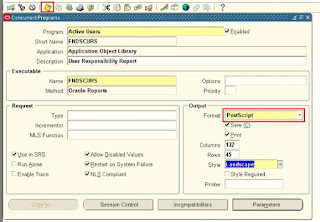
- Now edit the uiprint.txt file. This file will be located under the location $ORACLE_HOME/guicommon6/tk60/admin.
- Now add the following entry: <your postscript printername>:PostScript:1:5th FLOOR:default.ppd Note: I skipped this 4th step.
- Now shutdown the APPS services.

3. Step-by-Step Solution & Remediation
To fix this issue permanently, you must synchronize the EBS Context File, run AutoConfig, and ensure environment scripts export the correct display settings.
Phase 1: Modify the EBS Context File
Instead of hardcoding environment files that get overwritten by future maintenance, update the source of truth—the AutoConfig Context File:
Navigate to the
$APPL_TOP/admindirectory (or locate the active<CONTEXT_NAME>.xmlfile).Locate the display tag: <oa_var type="string" id="s_display">hostname:0.0</oa_var>
Update the value to point to your active X11 server or virtual display framebuffer (e.g.,
localhost:10.0orserver_name:0.0).
Phase 2: Run AutoConfig
Shut down application tier services to prevent locked files, then execute AutoConfig to regenerate template configuration files:
# 1. Stop Application Services
$ADMIN_SCRIPTS_HOME/adstpall.sh
# 2. Run AutoConfig
cd $COMMON_TOP/admin/scripts/<CONTEXT_NAME>
./adautocfg.sh
# 3. Apply Environment Customization (if necessary)
If your environment requires custom override logic, add your export rules to the bottom of the environment file under the designated customizations block:
# Locate your environment file in $APPL_TOP (e.g., APPS<instance>.env)
# Begin customizations
DISPLAY="localhost:10.0"
export DISPLAY
# End customizations
Phase 3: Restart Services and Validate
Start the application services and verify the fix:
- Verify Environment Variable: Re-run the concurrent program
Prints environment variable valuesfor parameterDISPLAYand confirm it reflects the updated string.
- Verify via Application Form: Help > Diagnostics > Examine

- Select Block :
$ENVIRONMENT$ - Select Field: DISPLAY

4. Verification and Regression Testing
To confirm that Oracle Reports and Oracle Toolkit are fully operational:
Run the Diagnostic Test: Submit the concurrent program
CP Postscript Report Regression Testwith the default parameterBASIC.
Re-test the Target Report: Submit the Active Users program (or any standard PDF/PostScript report).


5. Real-World Tip: Workaround for Persistent Interactive Sessions
If you have updated your configuration but the Active Users report continues to fail with REP-3000 during an ongoing maintenance window, try this real-time DBA workaround:
Open a new SSH connection (e.g., using PuTTY) to the application tier server with X11 Forwarding enabled.
Run
xclockinside the terminal session to establish the active display tunnel.Leave this terminal session open in the background.
Re-submit the failed concurrent program from the application interface.
The Concurrent Manager process will leverage the active X11 tunnel maintained by the open SSH session, allowing the Oracle Toolkit to initialize and complete report generation successfully.
References & Further Reading
My Oracle Support Doc ID 207532.1: Troubleshooting Tips For REP-3000 Error when Running E-Business Suite PDF/POSTSCRIPT/HTML Reports
Oracle Applications Technology Stack Guidelines: Configuring X11 Display Servers and VNC for Oracle Reports Engine in Unix/Linux
****************************நன்றி****************************

Comments
Post a Comment